
If you work with Business Central customers, Copilot is no longer a side topic. In the last two years Microsoft has moved from a handful of AI helpers to a growing set of agents that can watch mailboxes, draft documents and leave work for a human to review. Version 29 (2026 release wave 2) continues that shift, and last week’s Directions EMEA keynote in Paris laid out where Copilot in Business Central goes next.
This post is a practical guide for consultants and customers. First I’ll cover what you can use today. Then I’ll walk through the roadmap announced by Aida Seifi Labrosse, the new General Manager for Business Central, and finish with what I’d do in a design workshop this month.
What Copilot and agents look like in Business Central today
Microsoft groups AI in Business Central into two ideas. Copilot works with you: you ask, it suggests, you decide. Agents work for you: they pick up a process (often overnight), draft the result and leave a task for a supervisor. Both are configured from the same Copilot & agent capabilities page, and both are online-only.
Here are the capabilities I would put on a shortlist for most mid-market customers on version 29.
Sales Order Agent
The Sales Order Agent monitors a Microsoft 365 mailbox, reads customer requests (including PDF, PNG and JPG attachments), finds the contact and items in Business Central, and drafts a quote for review. When the customer confirms, it can turn that quote into an order.
Recent updates, confirmed in Message Center RM578065 and Microsoft Learn, make it much more usable in real companies:
- Multiple agents per company. Each instance has its own mailbox, folder, signature, processing rules and KPI metrics (emails received, quotes created, orders created, time saved). That lets you split agents by sales team, product line or customer segment.
- Layered item matching. Exact identifiers first (item number, vendor item number, GTIN, cross-reference), then semantic attribute matching (colour, material, size), then a broader fuzzy search.
- Larger PDFs. Attachments can be up to 50 pages (previously 10), with a cumulative content limit of about 150,000 characters per email. When an attachment is skipped, Business Central stores the reason on the attachment record.
- Relevance filtering and Try it out. Out-of-scope messages and attachments are filtered before processing, which also protects Copilot Credits. You can test the agent from setup without sending a real email.
If you sell across several channels, this is the agent I’d pilot first. Clean item master data, GTINs and cross-references matter more than ever.
Payables Agent
The Payables Agent watches a mailbox for vendor invoices, uses Azure Document Intelligence to extract the content, proposes a purchase invoice draft (including purchase order matching) and leaves it for an agent supervisor to review before finalisation.
In version 29, purchase order matching is stronger. The agent can use line amount and expected receipt date when choosing between similar PO lines, respects the Receipt on Invoice setting, and surfaces amount-based draft warnings without blocking finalisation. Message Center RM577878 also confirms that vendor credit note support is planned for general availability in November 2026: the agent will create a purchase credit memo and apply it to the original invoice. Return-order matching is not included, so plan that gap into AP process design.
Everyday Copilot helpers
Alongside the agents, several Copilot features sit inside normal pages. These are the ones I see customers adopt fastest:
- Bank reconciliation assist. After standard automatch runs, Copilot proposes matches for remaining statement lines and suggests G/L accounts for unmatched ones.
- E-document matching. Maps vendor e-invoices to purchase orders and lines, proposing matches and flagging exceptions.
- Sales line suggestions. From a few words, pasted text or an uploaded file, Copilot proposes lines on a quote or order.
- Marketing text suggestions. Drafts item descriptions from attributes and tone preferences. With the Shopify connector, you can push that copy to the store.
- Analysis assist. Turns a list into a grouped, filtered or pivoted analysis view using natural language, without leaving Business Central.
- Chat, Autofill and Summarize. Chat finds records and explains how to do things (including add-on apps). Autofill suggests field values. Summarize gives a short, role-aware briefing beside a record.
Version 29 also puts the unified Microsoft Copilot chat experience into public preview, so the chat panel looks and behaves more like Copilot elsewhere in Microsoft 365. From v29, the Chat capability controls that experience rather than the older Chat with Copilot feature.
The Business Central MCP server
The Model Context Protocol (MCP) server is the bridge that lets AI clients and agents talk to Business Central data and actions. Message Center RM576789 confirms that the MCP server can now expose the full set of standard Microsoft APIs, plus API queries. In version 29 you can also run custom data queries through MCP tools when no existing API fits.
For partners building agents in Copilot Studio, or connecting other MCP-aware clients, that means far less need for custom API pages just to give an agent something to read or write. You still decide which APIs and operations (read, create, modify, delete, actions) each configuration allows.
How to set Copilot up properly
Three admin steps matter before you demo anything to a customer:
- Open Copilot & agent capabilities. Search for it with Tell Me. Activate or deactivate individual features, and review the preview versus generally available sections.
- Allow data movement across geographies when required. If the toggle appears, Azure OpenAI for some Business Central-native Copilot and agent features sits in a different geography from the environment. Turning it off makes those features unavailable. Environments in the EU Data Boundary stay inside that boundary; some other regions route agent processing to the United States. Check the Azure Region of the environment in the admin center and read Microsoft’s data-movement documentation with the customer.
- Plan agent billing. Sales Order Agent, Payables Agent, Expense Agent (preview) and custom agents use Copilot Credits on a consumption model. Classic Copilot helpers that ship with the Business Central licence are separate. Credits can come from prepaid Copilot Credit packs or pay-as-you-go, and capacity is shared across the tenant. Microsoft publishes example rates (for instance, processing a payables invoice costs 50 credits plus 5 per line). Use the Agent usage estimator and Power Platform capacity views before you promise a production rollout.
Also grant the right permission sets. Most Copilot features use Copilot Sys Features or feature-specific page permissions; agents have their own permission models and a supervisor review loop. Version 29 adds a dedicated agent task pane, inline review of agent-generated content on pages, and clearer agent permission requests.
The Copilot roadmap from Directions EMEA 2026
At the Directions EMEA 2026 keynote in Paris (27 October 2026), Aida Seifi Labrosse described Microsoft’s “One Copilot in Business Central” direction: a single sidecar experience for analysis, briefings, customer work and actions. The roadmap dates reported by MSDynamicsWorld from that keynote are:
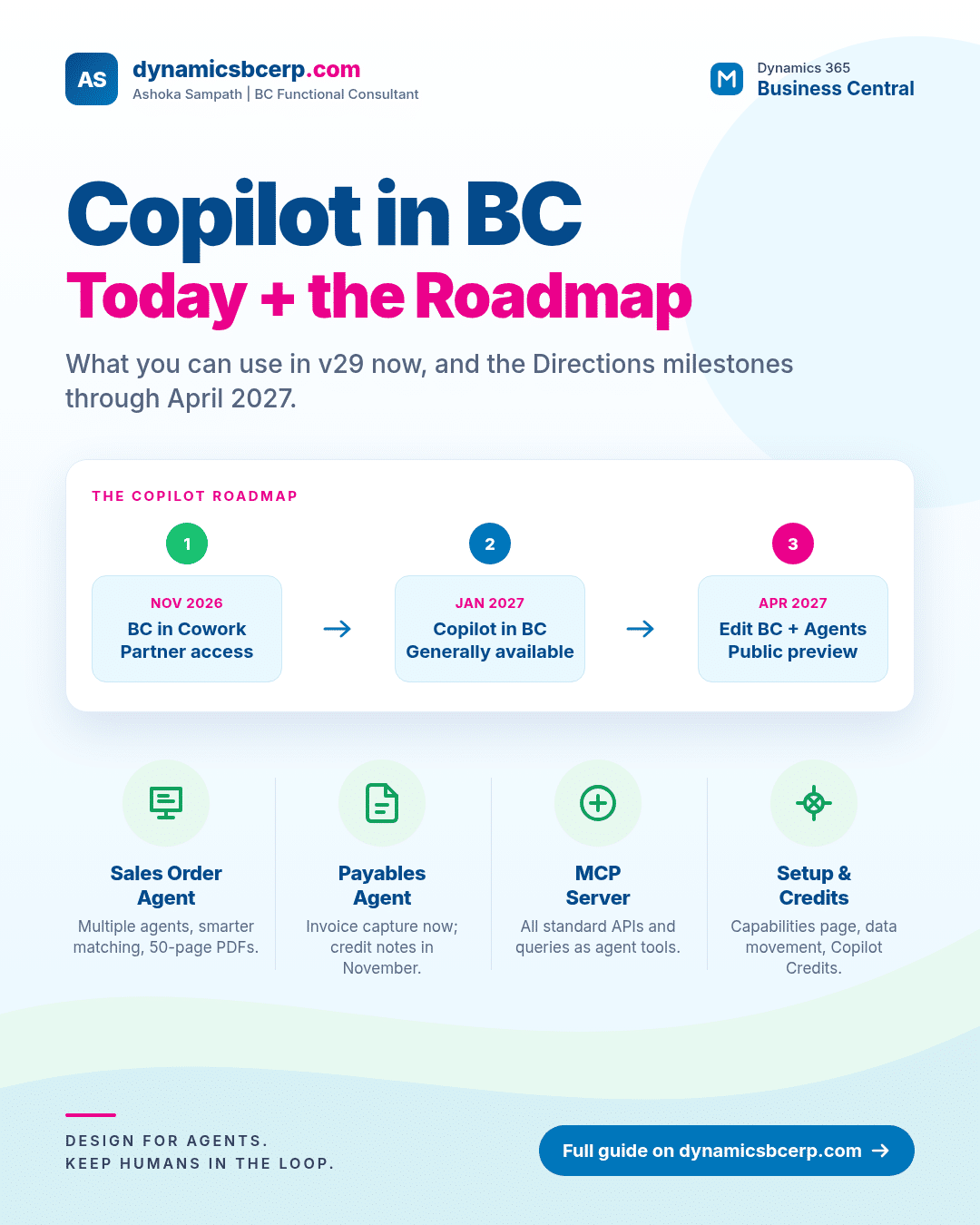
- November 2026 — Business Central in Microsoft 365 Copilot Cowork: partner early access.
- January 2027 — Copilot in Business Central reaches general availability, with a public preview of BC in Cowork.
- April 2027 — Public preview of Edit BC with Copilot, Edit BC in Cowork, BC agents in Cowork, and Business Skills.
The same sessions also previewed where the product is heading. “Edit with Copilot” (already in partner early access) lets users change Business Central data with natural-language instructions while respecting their permissions. Business Skills are human-readable rules that tell Copilot how to behave in BC (for example, when to add a free item to an order). Microsoft also spoke about Copilot-assisted setup and configuration as the starting point for AI-driven implementations, aimed at the large base of NAV and GP customers still to move to the cloud.
Treat those roadmap dates as Microsoft’s stated intent from the keynote, not as firm contractual commitments. Release timing can still shift, and detailed documentation will follow as each milestone opens.
What consultants and customers should do now
Points I’d put on a workshop agenda this month:
- Pick one process, not ten. Sales Order Agent for inbound quotes, or Payables Agent for invoice capture, usually gives the clearest ROI. Measure time saved and error rate before expanding.
- Fix the master data first. Item identifiers, cross-references, vendor bank details and e-document setups decide whether agents look clever or clumsy.
- Design the human loop. Agents draft; supervisors approve. Decide who owns the task pane, what “good enough to finalise” means, and how exceptions escalate.
- Budget Copilot Credits early. Model monthly volume with Microsoft’s credit examples, choose prepaid versus pay-as-you-go, and link the Business Central environment to the right Power Platform environment.
- Confirm geography and consent. Document whether Allow data movement is on, and make sure that matches the customer’s data residency policy.
- Brief stakeholders on the roadmap. Cowork early access in November, Copilot GA in January and Edit/agents/skills previews in April are the talking points for board and IT steering packs. Pair that with a sandbox plan so the organisation is ready when each wave lands.
- Watch the MCP server. If you build custom agents or ISV extensions, exposing standard APIs and queries through MCP reduces one-off integration work.
Final thoughts
Copilot in Business Central has moved from novelty to something you should design for. Version 29 gives you stronger agents, a clearer chat experience and an MCP server that opens the full standard API surface. The Directions roadmap points to Copilot becoming the main way people analyse, edit and act inside BC through 2027.
If you’re planning an agent pilot, a Copilot readiness review, or want a second opinion on credit consumption and geography setup, I’m happy to talk it through. Connect with me on LinkedIn or get in touch through this website. Follow along for more practical Business Central posts each week.
Sources and further reading
- Microsoft Learn: Business Central AI overview
- Microsoft Learn: Configure Copilot and agent capabilities
- Microsoft Learn: Data movement across geographies
- Microsoft Learn: Sales Order Agent overview
- Microsoft Learn: Set up Sales Order Agent
- Microsoft Learn: Set up Payables Agent
- Microsoft Learn: Reconcile bank accounts with Copilot
- Microsoft Learn: Configure Business Central MCP Server
- Microsoft Learn: Manage consumption-based billing
- Microsoft Learn: What’s new in update 29.0
- Microsoft Learn: Feature details in update 29.0
- Message Center RM578065 (Sales Order Agent updates)
- Message Center RM577878 (Payables Agent credit notes)
- Message Center RM576789 (MCP server APIs)
- MSDynamicsWorld: Directions EMEA 2026 Copilot keynote recap
Leave a Reply